Plans & billing
Each plan has its own contact and monthly throwing stick limits:
| Plan | Throwing sticks / month | Contacts | Groups |
|---|
Teams pricing and limits are set individually per business — contact sales to set one up.
Changing your plan
- 1
Open Change Plan
Go to Settings → Plan & Usage → Change Plan. Every plan except Teams can switch to any other — Teams is set up individually via contact sales.
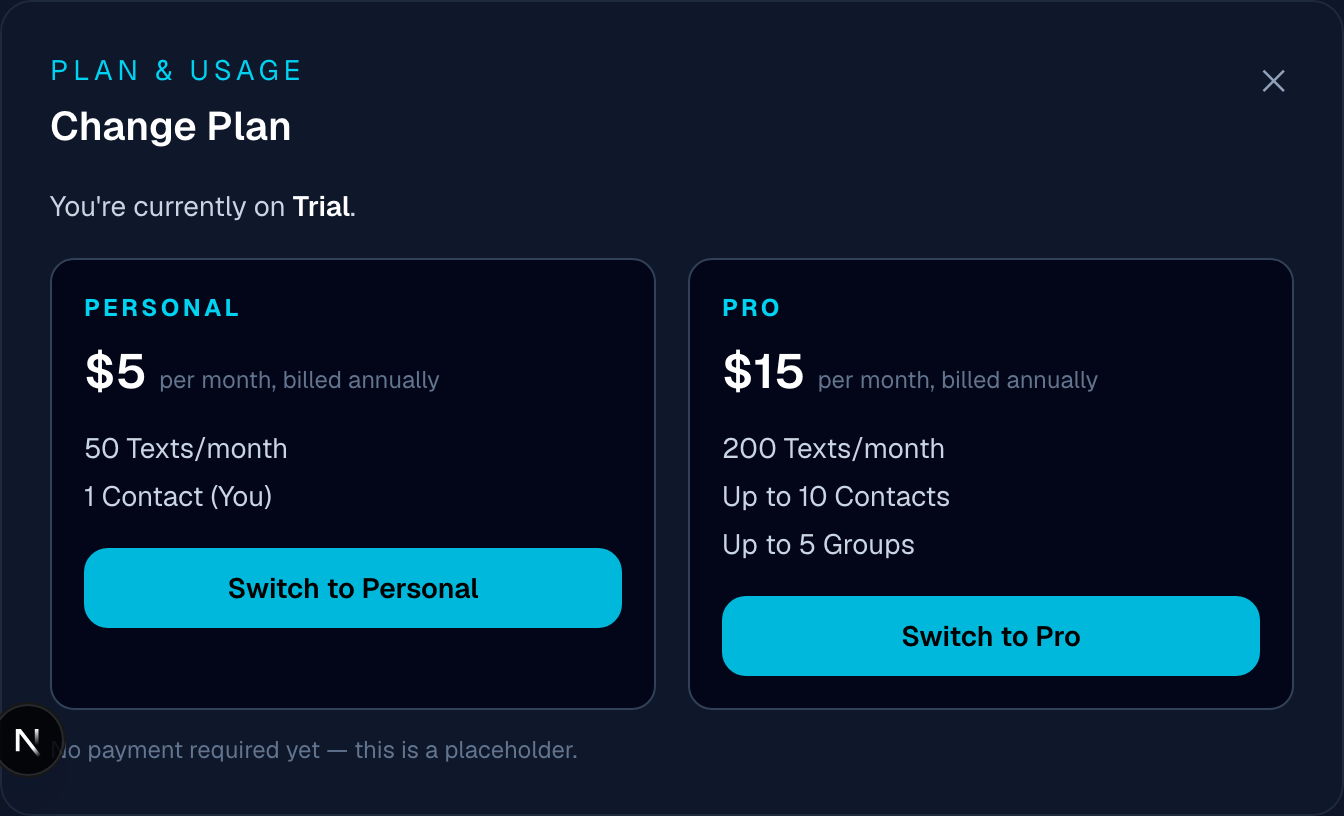
Each available plan shows its price and limits side by side. - 2
Check for the over-limit warning
If you have several active messages and switch to a plan with a lower limit than they'd use, the popup warns you before you switch. Confirming anyway pauses all of your active messages at once, and you're taken to the dashboard to turn back on whichever ones you want to keep within the new limit.
- 3
Confirm the switch
The change is instant — no payment step exists yet (see below).
Cancelling is available from the same Plan & Usage section. It's currently a placeholder — confirming signs you out and ends your session, but no real subscription or billing exists yet to cancel.
No billing integration exists yet, so plan changes and cancellation are free and instant — see Troubleshooting.
, and Teams' limits are set per business. Every new plan starts with 14 free days at full limits. For exactly how throwing sticks get used up, see What counts as a throwing stick?
Found a bug, or something not working as described?
textmetoo is in early access — tell us what happened and we'll get on it.